Don't let Claude Code read your secrets: why you need to set up sandboxing today
Claude Code is powerful. It reads your files, runs commands, and edits your codebase. But its default setup doesn't stop it from reading your secrets. Deny rules won't help in bypass mode. Native sandboxing will.
I was watching Claude Code debug a failing API integration when I noticed something in the terminal output that made me panic. It had read credentials from my environment, used them to hit live endpoints, and included the responses in our conversation to help diagnose the issue. Helpful? Sure. But those credentials are now sitting in my Claude conversation history. Forever.
And a data breach at Anthropic isn't even the scariest scenario. Think about prompt injection: a malicious README or a blog post in the wild that tricks Claude into exfiltrating your credentials. Or Claude installing a compromised npm package that phones home with whatever it can find. Your secrets are sitting right there in plain text, and Claude has the ability to read files, run commands, and make network requests. That's a lot of surface area.
Claude Code's permission system is designed around approving or denying tool calls: file reads, shell commands, and file writes. In the default mode, it asks you before doing anything potentially dangerous. That's fine in theory. In practice, you're clicking "allow" dozens of times a day and quickly stop reading what you're approving.
My first instinct: the deny list
After the incident, I asked Claude itself how to prevent this. It suggested adding a deny list to my permissions config:
{
  "permissions": {
    "deny": [
      "Read(**/.env*)",
      "Read(**/secrets/**)",
      "Read(**/*credentials*)",
      "Read(**/*secret*)",
      "Read(~/.ssh/**)",
      "Read(~/.aws/**)"
    ]
  }
}
Looks sensible, right? I thought so too, until I looked into how it actually works with the permission modes most people use.
Sandboxing and MacOS Seatbelt
The deny list above only works if you're running Claude Code in a mode that respects permissions. And let's be honest: most people run with --dangerously-skip-permissions ("yolo mode") because the constant permission prompts get old fast. In bypass mode, Claude still seems to respect the deny list, but it's not as soundproof as the sandboxing approach since it's not an OS level block.
The better answer is Claude Code's native sandboxing. On MacOS, this works via Seatbelt (never knew this even existed to this day!). Seatbelt is a OS-level system to enforce filesystem and network isolation on all bash commands and their child processes. It acts as a firewall for Claude Code. Even if Claude Code's own permission system is bypassed, Seatbelt will block it from doing questionable and potentially harmful things on your system.
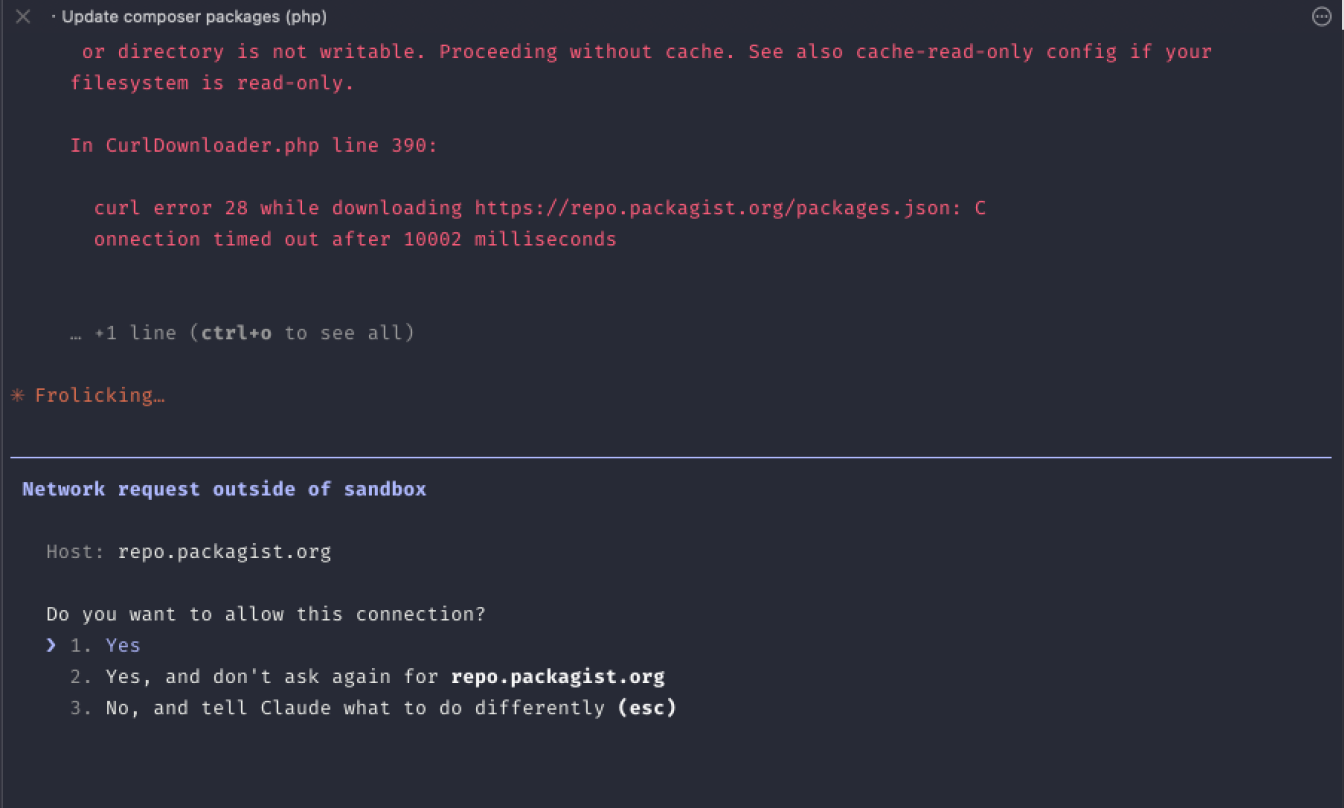 In the screenshot above, you see me asking Claude Code to run
 composer update (a package manager for PHP). Bypass permission mode is on. Had sandboxing been not turned on, Claude would oblige and just whizz through this task without hesitation. But since sandboxing is turned on, Claude wants me to whitelist that domain.
See how this could have saved me from harmful code sending my .env file and AWS keys by calling home without me even noticing? Thanks to the sandboxing firewall, no such surprises can occur now.
Setting up sandboxing
Sandbox settings merge across scopes instead of overriding each other. So you set a restrictive base in your user-level ~/.claude/settings.json once, and extend it per project. Your global config locks down filesystem access:
// ~/.claude/settings.json
{
  "sandbox": {
    "enabled": true,
    "excludedCommands": ["docker"],
    "allowUnsandboxedCommands": false,
    "filesystem": {
      "denyRead": ["~/.ssh", "~/.aws", "~/.gnupg", "~/.config/gcloud"]
    }
  }
}
Then each project adds what it specifically needs. Here's a realistic example for a web app with a local Postgres database and npm:
// .claude/settings.json (in your project)
{
  "sandbox": {
    "network": {
      "allowLocalBinding": true,
      "allowedDomains": [
        "github.com",
        "registry.npmjs.org",
        "*.npmjs.org"
      ]
    }
  }
}
The arrays get combined, not replaced. The global config blocks reads to your most sensitive directories, excludes docker from sandboxing (it's incompatible), and sets allowUnsandboxedCommands to false. This apparently closes a loophole where Claude tries to run a command in unsandboxed mode just to push through.
The project config lets your dev server bind to localhost, and whitelists github and npm. Adapt the allowedDomains to whatever your project actually needs. Or start empty, and let Claude ask you to whitelist as you (easiest approach).
One gotcha if you use relative paths like "." in your configs: they resolve relative to where the config file lives. In project settings, "." means the project root. In user-level settings, "." resolves to ~/.claude. So always put project-specific paths in your project-level config. If you commit it to your repo, your whole team gets the same sandbox rules.
You can test what files you ended up blocking by typing /sandbox from within Claude Code and going to the configuration tab. It will show you the combined configuration for the active folder you're in.
Benefits of Seatbelt (MacOS Sandboxing tool)
I'm on MacOS, so I don't know how sandboxing works on Linux (but I read that it's supported there as well). Let me tell you more about what other safety measures you get by turning on sandboxing on MacOS.
And FYI, I'm just quoting this part from Claude, so I didn't test each claim below myself. Do your own research as needed.
What gets blocked (by default):
Sandboxed commands can only write to the current working directory and its subdirectories.
Everything else on disk is read-only. So if a bash command tries to
touch /usr/local/bin/somethingor write to~/.bashrc, it gets a "read-only file system" error.The sandbox also enforces network isolation. Network isolation ensures that Claude can only connect to approved servers, preventing a compromised Claude from leaking sensitive information or downloading malware
That's... it? Yes! But think about the implications of blocking writes outside of the current folder. That's already huge. That means your system or personal files cannot be tampered with. And no unapproved network requests going out of your computer. Both life savers.
What you should do today
Go and add these settings to your user level Claude settings. This will enable sandboxing for all of your projects and give you that much more safety when you are running Claude Code in "YOLO" mode.
// The final ~/.claude/settings.json
{
  "permissions": {
    "deny": [
      "Read(**/.env*)",
      "Read(**/secrets/**)",
      "Read(**/*credentials*)",
      "Read(**/*secret*)",
      "Read(~/.ssh/**)",
      "Read(~/.aws/**)"
    ]
  },
  "sandbox": {
    "enabled": true,
    "excludedCommands": ["docker"],
    "allowUnsandboxedCommands": false,
    "filesystem": {
      "denyRead": ["~/.ssh", "~/.aws", "~/.gnupg", "~/.config/gcloud"]
    }
  }
}
The bigger picture
I'm not saying don't use --dangerously-skip-permissions. I use it myself. But don't assume the defaults are safe enough. A sandbox config takes a couple of minutes to set up. That's a pretty good trade for not accidentally sharing your production database password with a language model.
And think of this sandboxing as just a bare minimum for system "hygiene." Knowing what I know right now, I would never go back to running Claude Code on my personal machine without these precautions. As you may know just recently, axios got poisoned, a package that enjoys millions of installs worldwide. No one saw that coming. We should all be prepared for the next such incident as much as we can.
Stay safe, enjoy the age of coding with LLMs! 🎉